

OpenFOAM
Submit OpenFOAM computational fluid dynamics jobs. Uses the same form layout as the General submission page.
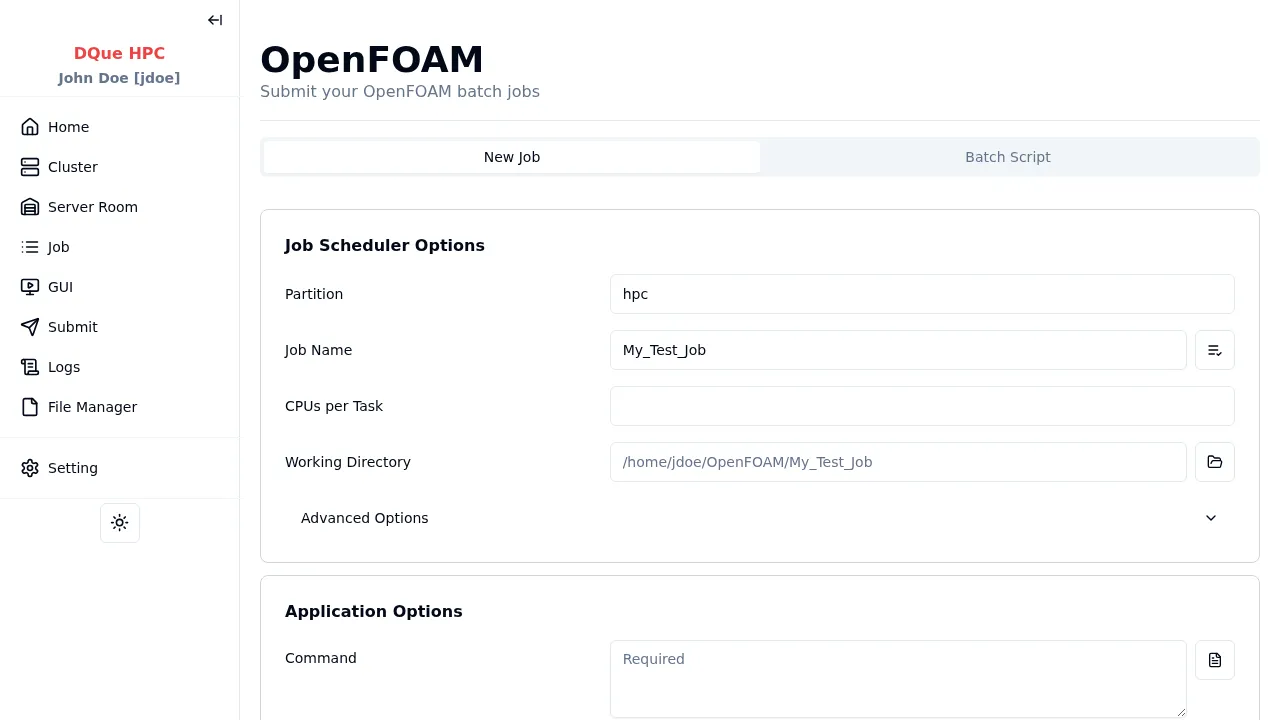
Step 1: Job Scheduler Options
Section titled “Step 1: Job Scheduler Options”- Partition — select the partition.
- Job Name — assign a name.
- CPUs per Task — specify CPU cores.
- Working Directory — where OpenFOAM reads case files and writes results.
Step 2: Application Options
Section titled “Step 2: Application Options”- Command — OpenFOAM commands to execute (required), e.g.,
blockMesh && simpleFoam. Supports template loading.
Note: GUI mode is not available for OpenFOAM. Container (Apptainer) mode is available via the Container tab.
Step 3: Environment Variables (optional)
Section titled “Step 3: Environment Variables (optional)”Add variables for the OpenFOAM environment (e.g., WM_PROJECT_DIR, FOAM_RUN).
Step 4: Submit
Section titled “Step 4: Submit”Click Submit to send the job to the SLURM scheduler. Monitor the job on the Job Monitor or check output on the Job Logs page.